
Quick Answer
Document the other driver’s social-media and personal-device activity by saving public posts, exact timestamps, usernames, URLs, screen recordings, witness names, dashcam footage, and the Texas Peace Officer’s Crash Report (CR-3), then have a lawyer send preservation letters and use Texas discovery to seek phone, app, vehicle, and account data. Do not touch the other driver’s phone, hack an account, message the driver, or use a fake profile.
TxDOT reports that distracted driving caused 86,384 crashes on Texas roads in 2025, including 2,437 serious injuries and 299 deaths, so fast evidence preservation can matter in a disputed liability claim. Ryan Orsatti Law helps injured people in San Antonio and across Texas build a lawful crash timeline before digital evidence is deleted, overwritten, or disputed. (TxDOT)
Key Takeaways
- Save what you can lawfully see, such as public posts, stories, usernames, handles, URLs, timestamps, location tags, and comments.
- Do not access private accounts, touch the other driver’s phone, impersonate anyone, or contact the driver about the crash.
- A single screenshot is rarely enough by itself. The goal is a timeline that matches the CR-3 crash time, witness statements, photos, dashcam video, phone records, and app activity.
- Texas prohibits using a portable wireless communication device to read, write, or send an electronic message while operating a motor vehicle unless the vehicle is stopped. (Texas Statutes)
- Texas discovery can reach relevant electronic data, but requests must be targeted and must specify the form of electronic or magnetic data requested.
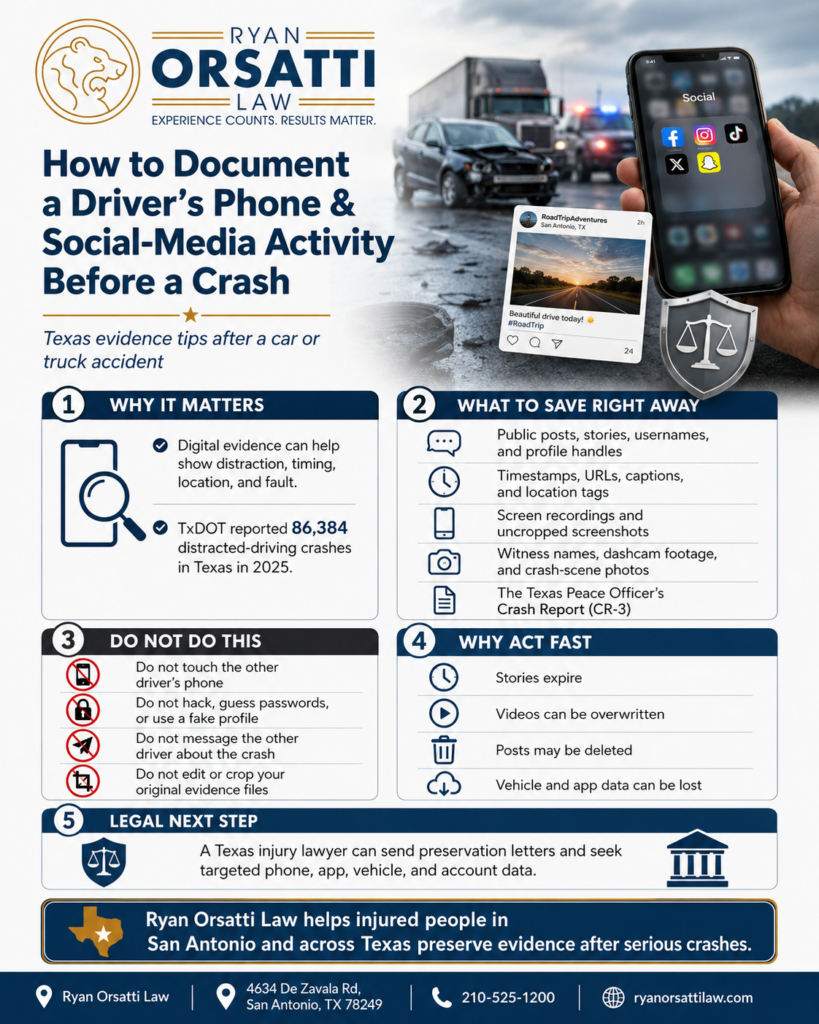
Why does the driver’s phone or social-media activity matter after a Texas crash?
The driver’s phone or social-media activity matters because it may show distraction, timing, location, fatigue, impairment, or statements that affect fault. In a San Antonio crash on Loop 1604, I-10, I-35, US-281, or Loop 410, a post, message, livestream, map search, or app notification near the crash time can help explain why a driver failed to brake, drifted lanes, ran a red light, or did not see traffic stopped ahead.
Texas law does not treat every phone use the same, but electronic messaging while driving is specifically addressed by Texas Transportation Code § 545.4251. That statute makes it an offense to use a portable wireless communication device to read, write, or send an electronic message while operating a motor vehicle unless the vehicle is stopped. (Texas Statutes)
In a civil injury claim, the issue is usually negligence, meaning the failure to use ordinary care. A driver’s digital activity can help prove negligence if it connects to the crash, but it still has to be relevant, authenticated, and tied to the actual collision timeline.
What should I document in the first 24 hours after the crash?
In the first 24 hours, document only what you can lawfully see, save, and identify: the crash time, public posts, visible phone use, witnesses, vehicles, roadway, dashcam footage, and CR-3 information. The goal is not to “investigate” by invading privacy. The goal is to preserve facts before posts disappear, stories expire, memories fade, and vehicles are repaired.
Start with the basics. Write down the exact crash location, direction of travel, lane positions, weather, traffic signals, nearby businesses, and the time shown on your phone, 911 call log, tow paperwork, or photos. Later, compare that with the Texas Peace Officer’s Crash Report (CR-3), which TxDOT allows eligible users to obtain through its crash report system. (TxDOT)
For a broader first-day checklist, Ryan Orsatti Law has a related guide on the first 24 hours after a San Antonio car accident.
How should I screenshot a public post so it can be useful later?
A useful screenshot should show the post, account name, handle, URL or platform path, visible timestamp, comments, location tags, and the date and time you captured it. A screen recording is often better than a single screenshot because it can show how you reached the post from the public profile and what account or platform you were viewing.
Take screenshots in a way that preserves context. For Instagram, TikTok, Facebook, X, Snapchat public content, YouTube, or livestream clips, try to capture the profile page, the post itself, the caption, the visible timestamp, the URL if available, and any location tag. If the platform does not show a full timestamp, write down what it displayed, such as “posted 2h ago,” and record the exact time you captured it.
Do not edit, crop, annotate, or filter the original image. Save an untouched version first. If you later mark up a copy for your lawyer, keep the original file separate.
What should I write down about visible phone use at the scene?
Write down observable facts about phone use, not guesses: whether the driver held a phone, looked down before impact, wore earbuds, had a screen lit, or made statements about texting, maps, music, or social media. Also write down who saw it, where that person was standing, and whether anyone mentioned the phone to the officer.
Examples of useful observations include:
- “The driver said, ‘I was looking at my GPS.’”
- “A witness said the driver had the phone up near the steering wheel.”
- “The driver was still on a phone call when I walked up.”
- “The phone was mounted on the windshield with a video playing.”
- “The driver said they were coming from a bar, concert, work shift, delivery route, or rideshare trip.”
Stick to facts. Do not accuse the driver online. Do not argue at the scene. Tell the responding officer what you personally saw and ask witnesses for their names and phone numbers.
What evidence can show social-media or device activity before impact?
The best evidence usually combines public social-media captures, witness observations, phone records, app logs, vehicle data, dashcam footage, and the CR-3 crash timeline. Texas courts look for evidence that makes a fact more or less likely, and the Texas Rules of Evidence require proof that an item is what the proponent claims it is.
| Evidence source | What it may show | How to preserve it | Common problem |
|---|---|---|---|
| Public social-media post, story, livestream, or comment | Posting, recording, scrolling, location, timing, or inconsistent statements | Screenshot and screen record the public post with username, handle, URL, timestamp, and capture time | Cropped screenshots often miss account details and timing |
| Witness statement | Driver looking down, holding phone, recording, or admitting phone use | Get name, phone, email, and exact words heard | Witnesses disappear if not contacted quickly |
| Phone carrier records | Call or text timing, depending on what records exist and what legal process allows | Lawyer may seek targeted records through discovery or subpoena | Carrier records may not show app scrolling or content |
| App or account data | Messaging, posting, livestreaming, route, or login activity | Lawyer may request targeted account data or device production when relevant | Private account data usually requires legal process |
| Vehicle infotainment, CarPlay, Android Auto, or telematics | Connected phone, calls, navigation, speed, braking, or route data | Send preservation letter quickly to driver, owner, employer, insurer, or fleet operator | Data can be overwritten, reset, or lost during repairs |
| Dashcam, business camera, or traffic-adjacent video | Driver head movement, phone in hand, lane drift, signal phase, or impact sequence | Identify cameras within 24 to 48 hours and request preservation | Many systems overwrite video within days |
Key takeaway: The strongest distracted-driving proof usually comes from a synchronized timeline, not from a single screenshot by itself.
How can a Texas lawyer obtain phone, app, or social-media evidence?
A Texas lawyer can pursue phone, app, and social-media evidence through preservation letters, targeted discovery, subpoenas, depositions, and, in some cases, court orders. Texas Rule of Civil Procedure 192.3 allows discovery of relevant, nonprivileged information, and Rule 196.4 requires a party requesting electronic or magnetic data to specifically request the data and specify the form for production.
That means the request should be narrow. A good request does not ask for “everything on the driver’s phone.” It asks for defined categories tied to the crash, such as activity logs, messages, call records, app usage, location data, social-media posts, or connected-vehicle data during a specific window before and after the collision.
In serious crashes, Ryan Orsatti Law often looks at the full evidence map, including the driver, vehicle owner, employer, rideshare platform, delivery company, trucking company, insurer, nearby businesses, dashcam owners, and witnesses. The right source depends on the vehicle, the driver’s status, and the reason phone use matters.
What should I avoid when trying to document the driver’s activity?
You should avoid anything that invades privacy, changes evidence, creates harassment, or makes you look unreliable. Do not touch the other driver’s phone, unlock a device, guess a password, create a fake profile, send messages, threaten the driver, buy questionable data, or post accusations about the crash.
You should also avoid deleting or editing your own posts about the crash. Spoliation means loss, destruction, or alteration of evidence that may matter in a claim. Even an innocent deletion can create a distraction in the case if the other side argues that relevant evidence was removed.
If an adjuster calls quickly and asks for a recorded statement before the digital evidence is preserved, be careful. For more on that issue, see Ryan Orsatti Law’s guide to the insurance adjuster’s phone call after a Texas accident.
Attorney Insight: Adjusters rarely change their liability position because someone says, “I think the driver was on the phone.” They pay attention when the timeline lines up: crash time from the CR-3, public post timestamp, witness statement, dashcam angle, phone record, vehicle data, and medical documentation. The cleaner the timeline, the harder it is to dismiss the distraction issue as speculation.
How does this evidence affect fault and insurance in Texas?
This evidence affects fault and insurance by helping prove why the crash happened and whether the other driver failed to use ordinary care. In Texas, proportionate responsibility means fault can be divided by percentage, and Texas Civil Practice & Remedies Code § 33.001 bars recovery if the claimant’s percentage of responsibility is greater than 50 percent. (Texas Statutes)
Digital evidence can matter when the insurance company claims you stopped suddenly, changed lanes, missed a signal, or caused the wreck. If the other driver was posting, livestreaming, texting, checking a delivery app, using a rideshare platform, or scrolling near impact, that fact may help explain reaction time, lane position, braking delay, or failure to keep a proper lookout.
Texas injury lawsuits also have deadlines. In most Texas personal injury cases, Texas Civil Practice & Remedies Code § 16.003 gives a two-year deadline to file suit, but digital evidence should be preserved much earlier than that. (Texas Statutes)
What is the step-by-step evidence preservation checklist?
The step-by-step preservation checklist is to secure safety and medical care first, then preserve the crash timeline, public digital evidence, witnesses, video sources, and insurance communications before anything disappears. Use this checklist for crashes in San Antonio, Bexar County, Comal County, Guadalupe County, Kendall County, Wilson County, Atascosa County, Medina County, and across Texas.
- Call 911 and get medical care. Your health and the official crash response come first.
- Record the exact crash time and location. Use your 911 call log, phone photo timestamps, dashcam time, tow receipt, or officer information.
- Photograph the scene and vehicles. Capture final resting positions, damage, debris, skid marks, signals, signs, lanes, and nearby cameras.
- Document visible phone-related facts. Note whether the driver held a phone, looked down, had a mounted device, wore earbuds, or made statements about device use.
- Get witness contact information. Ask what they saw and whether they saw phone use, drifting, delayed braking, or video recording.
- Save public social-media evidence. Screenshot and screen record public posts with account names, handles, URLs, timestamps, captions, comments, and location tags.
- Preserve your own evidence. Save dashcam footage, photos, texts, call logs, location history, medical records, and repair documents.
- Do not post about the wreck. Social media posts can become evidence, and even harmless updates may be taken out of context.
- Request the CR-3 crash report. TxDOT provides a system for obtaining Texas Peace Officer’s Crash Reports when available. (TxDOT)
- Talk to a Texas personal injury lawyer early. A lawyer can send preservation letters and pursue targeted discovery before records are lost.
For related guidance, see Ryan Orsatti Law’s posts on social media after a commercial truck crash and how long it takes to get a crash report in Texas.
When should I contact Ryan Orsatti Law about driver phone or social-media evidence?
You should contact Ryan Orsatti Law as soon as you suspect the other driver’s phone, app, or social-media activity contributed to the crash. Digital evidence can be time-sensitive, and early legal action may help preserve posts, app logs, vehicle data, witness statements, business video, and insurer communications.
Ryan Orsatti Law helps injured people in San Antonio and across Texas evaluate distracted-driving evidence, fault disputes, medical documentation, insurance coverage, and preservation issues. If the wreck involved a car, commercial vehicle, rideshare driver, delivery driver, 18-wheeler, motorcycle, pedestrian, or serious injury, the evidence plan should be tailored to that specific crash.
For general car crash help, visit Ryan Orsatti Law’s San Antonio car accident lawyer page.
FAQ
Can social-media posts prove the other driver was distracted in a Texas crash?
Social-media posts can help prove distraction if the timing, account identity, location, and content connect to the crash. A post five minutes before impact may matter more than a post five hours earlier unless the earlier post shows fatigue, impairment, route, or intent to drive. The evidence still must be relevant and authenticated under Texas evidence rules.
Are screenshots enough to prove the driver was on the phone?
Screenshots may help, but they are usually stronger when supported by screen recordings, URLs, usernames, timestamps, witness statements, phone records, dashcam footage, or vehicle data. Texas Rule of Evidence 901 requires enough proof that the item is what it claims to be, so context and authentication matter.
Can my lawyer subpoena the other driver’s phone records?
A lawyer may seek targeted phone records, app data, device information, or account evidence when it is relevant and legally obtainable. In Texas civil cases, electronic discovery should be specific, proportional, and tied to the issues in the lawsuit. A broad request for everything on a phone is more likely to draw objections.
Should I message the other driver or follow them from a fake account?
No. Do not message the driver, use a fake account, impersonate someone, or try to access private content. Those steps can create ethical, evidentiary, and credibility problems. The safer path is to preserve public content, identify witnesses, save your own evidence, and let a lawyer use lawful preservation and discovery tools.
What if the driver deletes social-media posts after the crash?
Deleted posts may still matter if they were captured earlier, referenced by witnesses, preserved by metadata, or recoverable through lawful discovery. Do not assume deleted content is gone forever, but do not try to retrieve it yourself through improper access. Tell your lawyer what you saw, when you saw it, and whether you saved anything.
Does the CR-3 crash report show whether the driver was using social media?
A Texas CR-3 may include contributing factors, statements, driver information, location, crash time, and officer observations, but it usually will not provide a full phone or social-media analysis. Treat the CR-3 as the anchor for the timeline. Then compare it with witness statements, public posts, phone records, app data, and video evidence.
Is phone-use evidence different in a commercial vehicle or rideshare crash?
Yes. A commercial vehicle, rideshare, delivery, or 18-wheeler crash may involve extra data sources, such as dispatch logs, driver apps, employer policies, telematics, electronic logging devices, dashcams, GPS, or route records. Those records may be controlled by a company, platform, insurer, or fleet operator, so preservation letters should go out quickly.
Ryan Orsatti Law
4634 De Zavala Rd, San Antonio, TX 78249
Phone: 210-525-1200
ryanorsattilaw.com
This blog is for informational purposes only, not legal advice. Reading it does not create an attorney-client relationship. Past results do not guarantee future results.
Hurt in an accident in San Antonio? Learn how a San Antonio personal injury lawyer can help with your claim. Call 210-525-1200 or request a free consultation.
The firm works on a contingency fee. You pay nothing unless the firm recovers money for you, and that covers case expenses as well as the fee: if there is no recovery, you owe no attorney's fee and no case expenses. Ask for the fee agreement and read the fee and expense section before you sign anything.
Related San Antonio legal resources
Primary legal and public-data sources
- Texas Civil Practice and Remedies Code Chapter 16: limitations
- Texas Civil Practice and Remedies Code Chapter 33: proportionate responsibility
Ryan Orsatti Law
4634 De Zavala Road, San Antonio, TX 78249
General reference links. Consult each source for its current text.